The sine sweep workflow
A sine test drives the article at a tone — or several at once — and walks each tone along its own schedule. The specification is not a band to fill but a trajectory to hold: this frequency at this time at this level, with warning and abort tolerances around it. So the questions the workflow answers are a sweep's own: did each tone hold its level, everywhere along its path?
The walkthrough is the demonstration plate's sweep — four simultaneous
tones on four shakers into eight control channels, each tone on its
own schedule: one sweeping up, one
down through it, a near-dwell, and a log sweep — 16.5 seconds at
4096 Hz. The recording is generated by the controller
(generate_plate_sine.py in the generators repository) and lands at
stressdata/plate/sine.nc4.
| Step | In the app | In a script |
|---|---|---|
| Import the run | drag the .nc4 onto the window |
project.import_file(path) |
| The specification | arrives with the run — nothing to declare | (read from the file's environment) |
| See the sweep itself | the time history's wavelet reading | plot_scalogram(...) from visualdynamics.plot |
| Set the smoothing | the Sine Levels view: automatic, or a number of cycles | history.sine_extraction = SineExtraction(cycles=40) |
| Extract the levels | Extract Sine Levels on the bar, or on the view | project.extract_sine(project.time_history) |
| Judge them | select levels and specification together | plot_comparison(levels, spec) from visualdynamics.plot |
| Geometry and photos | drag them in, link them | project.add(...), project.link(...) |
| Report | Generate Report on the bar, the project row selected | project.generate_report('sine') |
| Or all of it at once | Automatic on the tree bar, once the project has its type | project.work_up() |
| Save | Save Project As… | project.save('sine.vdyn') |
In the app, step by step
1. Import the run — the specification comes with it
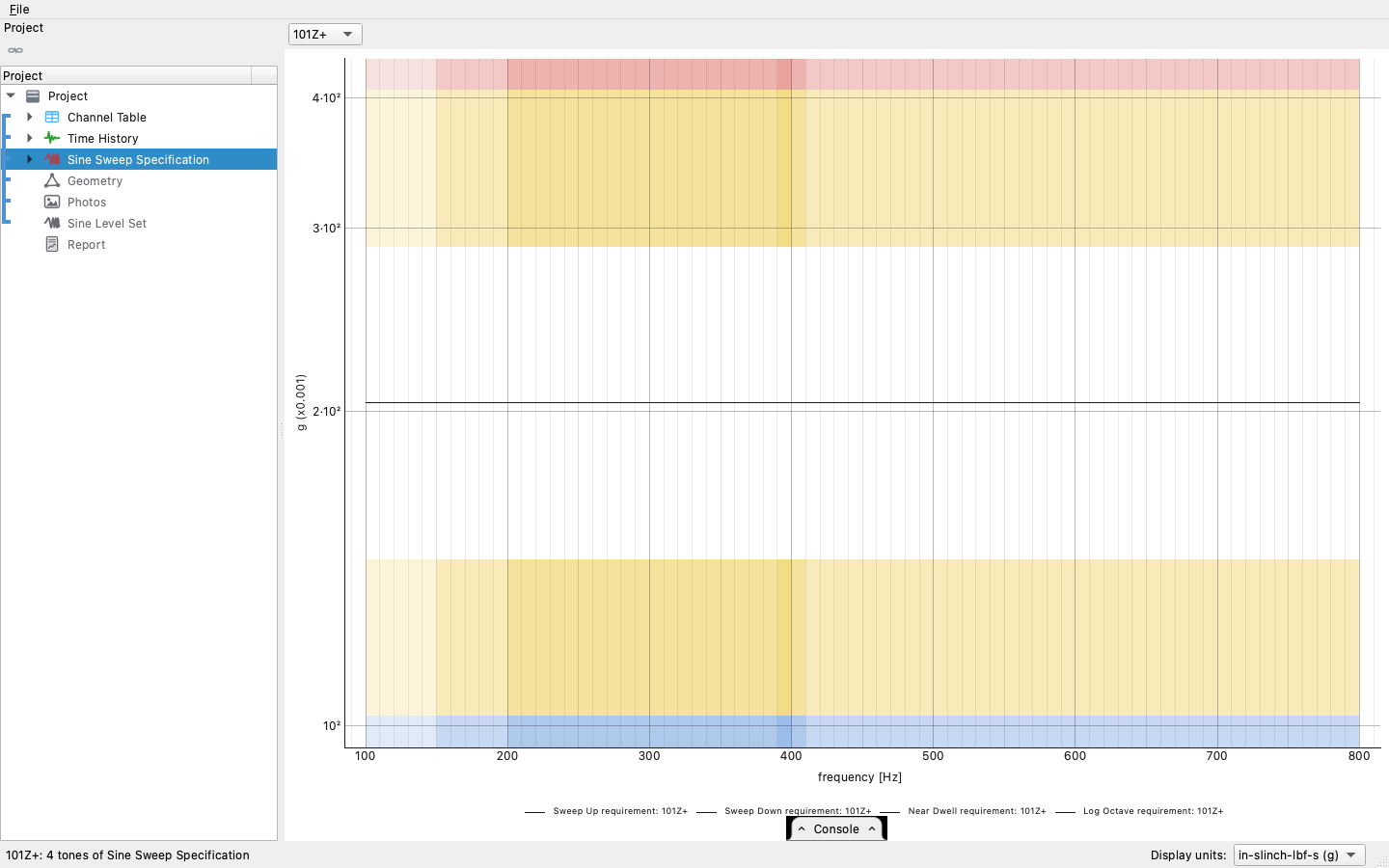
Drag the controller's recording onto the window. Unlike a shock or a transient, a sine run can say what it is: the file's environment carries the tones' schedules, so the project arrives typed Sine Sweep with its specification already in the tree — each tone's frequency trajectory, its target level along it, and the warning and abort bands around that. Selecting the specification opens on the stage — frequency across, time receding, amplitude up, one surface per tone — and the 3-D toggle stands it down to the flat per-channel reading shown here. The rows under the specification are its control DOFs, one per row, and picking rows restricts either reading to those DOFs; the tone is a drop-down on the bar. The stage draws every chosen DOF at once, each in its own color; the flat reading draws one at a time, the pair box on the bar choosing which.
2. See the sweep itself
Before any number is extracted, the record can be looked at the way a sweep actually is: the time history's wavelet reading draws frequency against time with amplitude as color, and a multi-tone sweep is its natural subject — four tones are four ridges, each walking its own path, crossing where they cross. The spectra a random workflow leans on would average all of that away.
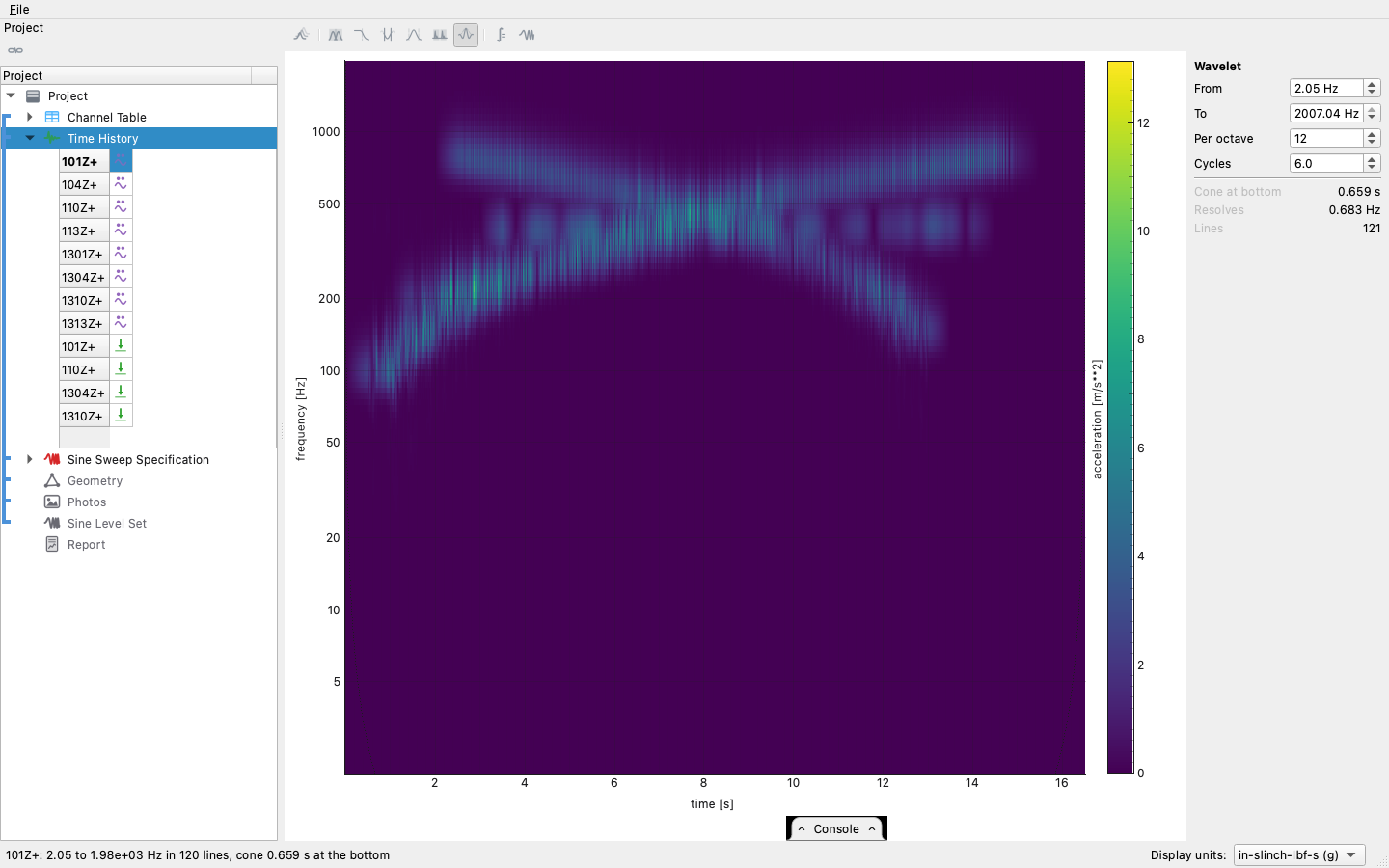
The ribbed look along each ridge is the record, not the transform: tones that pass within a wavelet's bandwidth of each other beat at their difference frequency, and the modulation is genuinely in the measured signal — band-pass the record with no wavelet anywhere and the same ripple is there.
3. Extract the levels
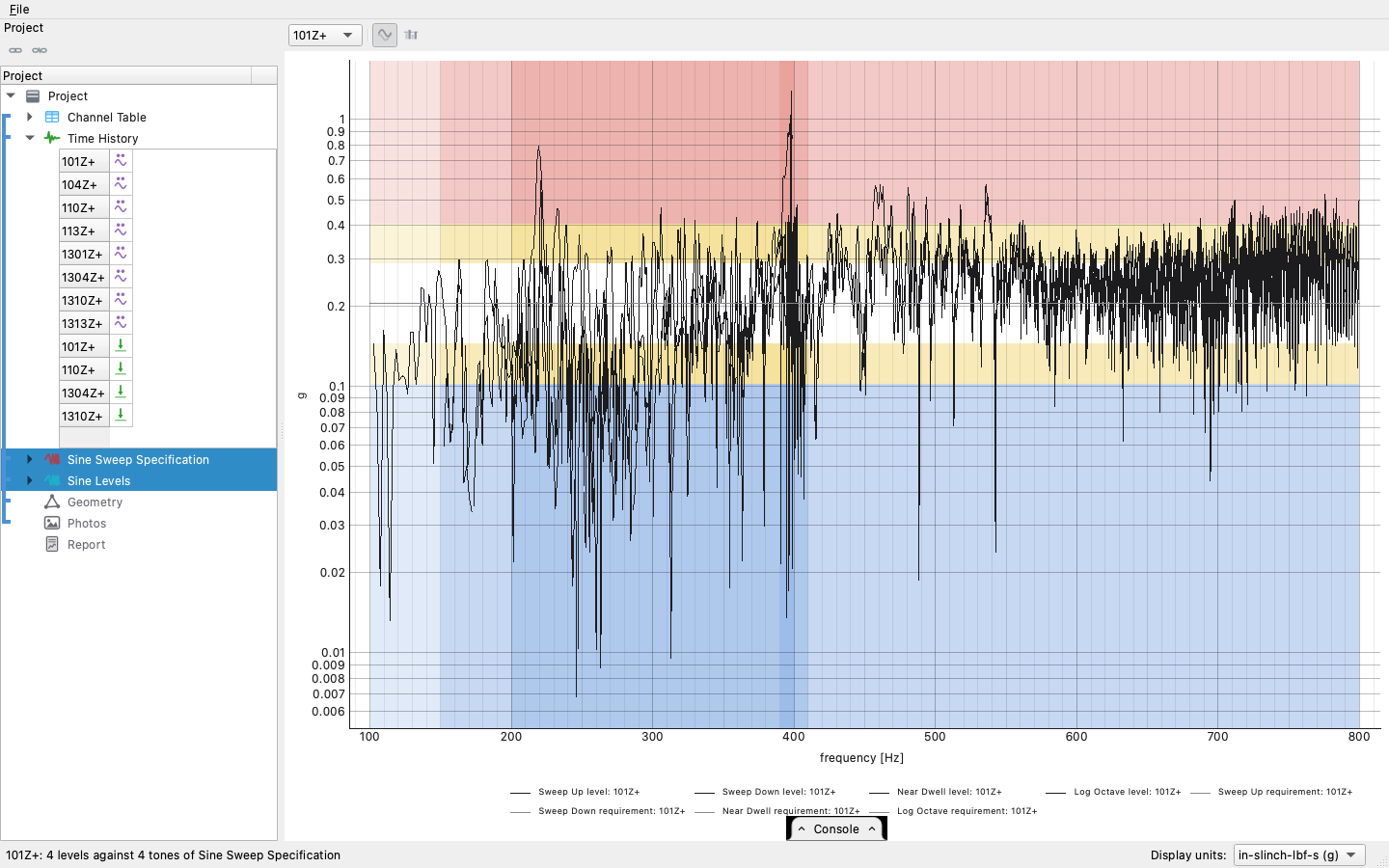
Extract Sine Levels on the bar, with the time history selected, reads each tone's achieved level out of the recording with a Vold-Kalman filter: every tone's own frequency trajectory is rebuilt from the specification, and the amplitudes riding all of them are solved for at once, each held to a slow curve over a set number of cycles. That is what separates the reading from a PSD — a swept tone never sits still long enough for an average — and, because the tones are solved jointly, two tones that run close together for a stretch are separated by their different frequency histories rather than each reading the other as its own level, which is what a tracking filter (the controller's own included) does.
How much each reading averages over is the one setting, and it rides the time history: the Sine Levels view on the plot bar, offered for a record beside a sweep specification, shows it with what follows from it — the smoothing window in seconds at the sweep's ends, the scatter a reading is predicted to carry, how much of the sweep sits under the noise floor — and the readings themselves sampled along each tone at that setting, so the trade is seen before anything is made. Automatic climbs the smoothing until a reading is predicted to scatter less than the target (1 dB) and says what it chose; a clean sine test stays at ten cycles, a sweep under a random environment goes to forty or more. Set takes the number typed. Follow the clock fits the sweep's clock to the recording and solves again when the recorded sweep drifted from the one commanded, so a long run does not read low toward its end. The button on the panel is the same Extract Sine Levels. A reading where the tone sat under the noise is reported at the floor and drawn as a hollow ring — how much was not seen, rather than a hole — and the deviation score leaves it out.
One object comes out, grouped the way the specification groups its tones, with a per-tone clock. Selecting the levels beside the specification draws each measured path over its target and zones, clocks aligned — on the stage by default, flat with the 3-D toggle off; the signed deviation bars judge the whole run tone by tone.
4. Geometry, photos, report
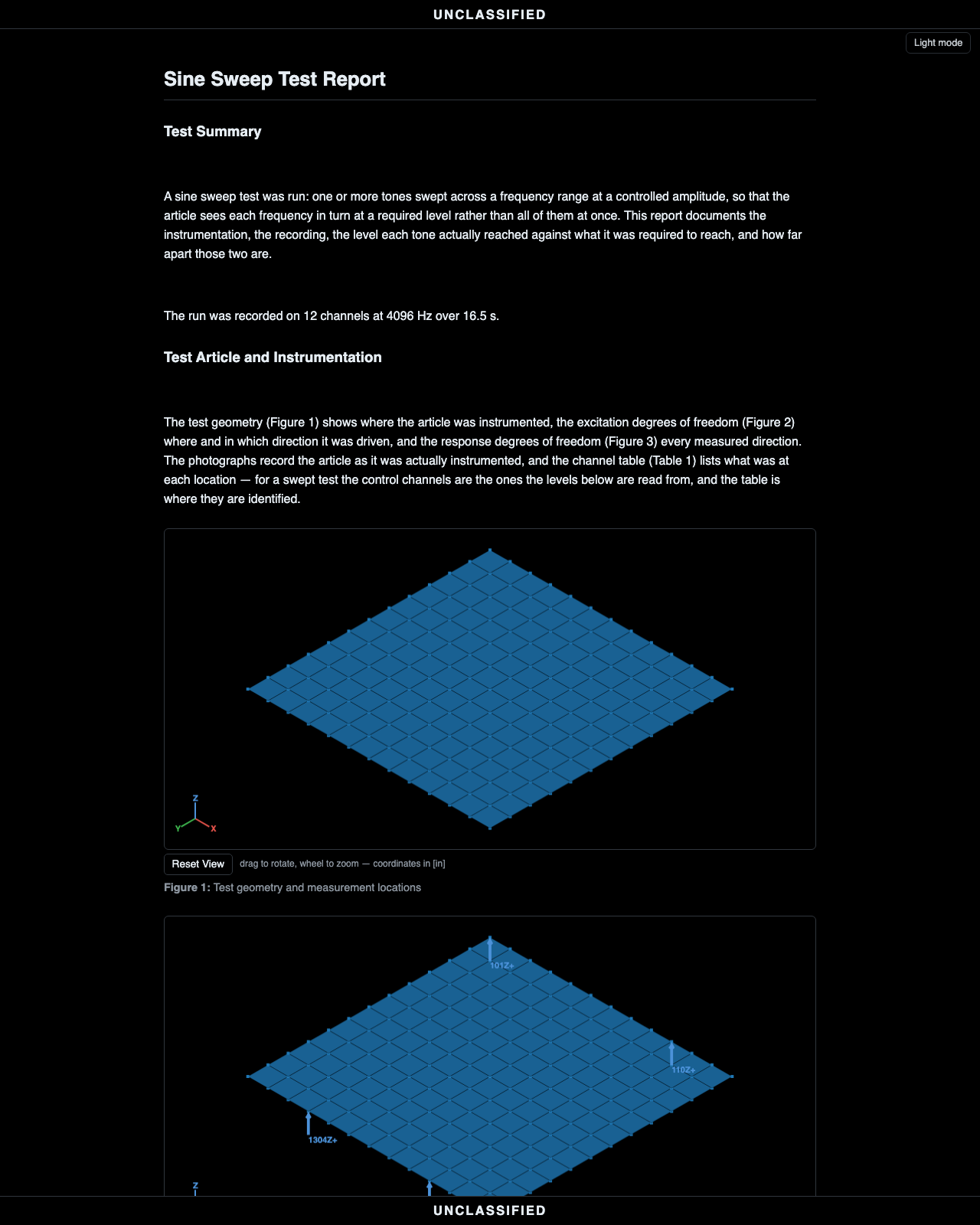
Drag the article's geometry in, declare its units, add the setup photographs, link the group. The sine report binds the specification, the levels over it, and one figure per tone — each tone judged along its own path, which is the only way a sweep can honestly be judged.
The same run, headless
And the script never has to be reconstructed by hand: the console tab along the bottom of the window writes it live as you click — every act of the session as the line that replays it. Expand it, copy the stretch you want, and it runs as-is.
import visualdynamics

project = visualdynamics.Project('Plate Sine Sweep')

# 1. the run carries its own specification; the project arrives typed
project.import_file('sine.nc4')
assert project.project_type == 'Sine Sweep'

# 2. geometry, photos, links
geometry = visualdynamics.import_file('geometry.npz')
geometry.define_units('m')
project.add('Geometry', geometry)
project.link(*project.names)
project.set_basis(*project.names)

# 3. the levels each tone actually held, solved jointly (Vold-Kalman)
project.extract_sine(project.time_history)

# 4. report and save
project.generate_report('sine')
project.export_report(project.report, 'sine_report.html')
project.save('sine.vdyn')
Where judgment lives
- A mixed run is a project type of its own. A random environment over a quiet sweep — the qualification-with-a-tracked-tone case — arrives as a Random and Sine project: both specifications import, the tree shows both halves' slots, and Generate Report writes two reports, a random report judging the random against its PSD and a sine report judging each tone against its level. The random report's control spectra are of the whole recording, sweep included, and it says so where a reader would otherwise take the tone for an exceedance.
- The extraction is per-tone, not per-band. Each tone is read along its own trajectory, and all of them together, so two tones crossing — or running close for seconds — do not corrupt each other's levels the way any fixed filter bank, or a tracking filter, would. What the extractor cannot do is separate two tones that share a trajectory — a tone and its own harmonic landing on another tone's path is read as that tone.
- A controller's level is read differently. Its tracking filter and detector are settings, and a harmonic, noise or a fast change in level moves its reading in ways the extraction's does not move; How a tracking filter reads a sweep reads a record the controller's way, setting by setting.
- Where the levels wobble, look at the wavelet first. A ripple in an extracted level can be the article (a resonance walked through), the test (two tones beating in one band), or the extraction. The scalogram shows which: a resonance is a bright patch at a fixed frequency, beating is ribbing where ridges pass close, and neither is the extractor's fault.
- Ramp time is part of the trajectory. A tone leaves its start
frequency at
start_time + ramp_time, and the extracted clock is aligned to the tone's onset — a lead-in before the sweep starts is not a level error, and the comparison does not read it as one.
One call
The whole thing is one call when the defaults are right, and the same
batch and folder rules as random_vibration_report: a run left out
is asked for, several may be chosen, and a folder path lands each
report under its run's own name.
import visualdynamics

visualdynamics.sine_report('sweep.nc4', 'report.html')
visualdynamics.sine_report('sweep.nc4', 'reports/', geometry='article.stp',
                           photos='setup_photos/', marking='TEST SERIES 4')
visualdynamics.sine_report()                     # ask for the runs and the geometry
project = visualdynamics.sine_run('sweep.nc4')   # the project, to go on with
A run that is random alone is random_vibration_report. A run that is
random and sine together gets both reports from run_report, below.
visualdynamics.run_report is the same call without the type: it reads
the run's own type and writes that report, so a batch may mix sweeps,
random runs and system identifications. A random-and-sine run gets
two, <name>_random.html and <name>_sine.html, the sine reading the
whole run even when last cuts the random. A streamed save with a
system ID's shape, two streams quiet then loud, is taken as one.
visualdynamics.run_report('run.nc4', 'reports/', geometry='article.stp', marking='TEST SERIES 4')
visualdynamics.run_report(['run_1.nc4', 'run_2.nc4', 'run_3.nc4'], 'reports/',
                          geometry='article.stp', marking='TEST SERIES 4')
A list of runs is a batch. Every run's type is read before the first report is written, so a batch that holds a run with no one-call report, a modal survey for example, is refused before anything is written.
The same batch runs from the window: File → Reports from Runs…
asks for the runs, then lists them in a table. Each run's Report
starts at the report its file declares, and can be changed to another
or to Leave out: a run with no one-call report starts at Leave out,
with the reason beside its name. Each run's Last is how many seconds
from the end of the run to read, whole run by default; the box below
the table sets it for every random report at once, the random half of a
random-and-sine run included, and leaves sine and system ID runs whole.
A script says the same with kinds={run: 'random', ...} and
last={run: 120.0, ...}. The same dialog takes the geometry, where the
reports go (beside each run, or one folder) and the marking. The reports are written in the window's unit
system, with the progress bar and Cancel at the bottom of the window;
a cancel takes effect when the run in progress finishes, and the
reports already written are kept. The open project is not changed.